How to update an order for Service Department
This document is designed to help you understand how you can update a Repair Order for the Service Department. The endpoint enables users to submit an existing Repair order with various parameters like orderDate, closeDate, orderNumber, etc..
The endpoint mentioned below can assist you in updating a Repair Order with customized parameters :-
Note:
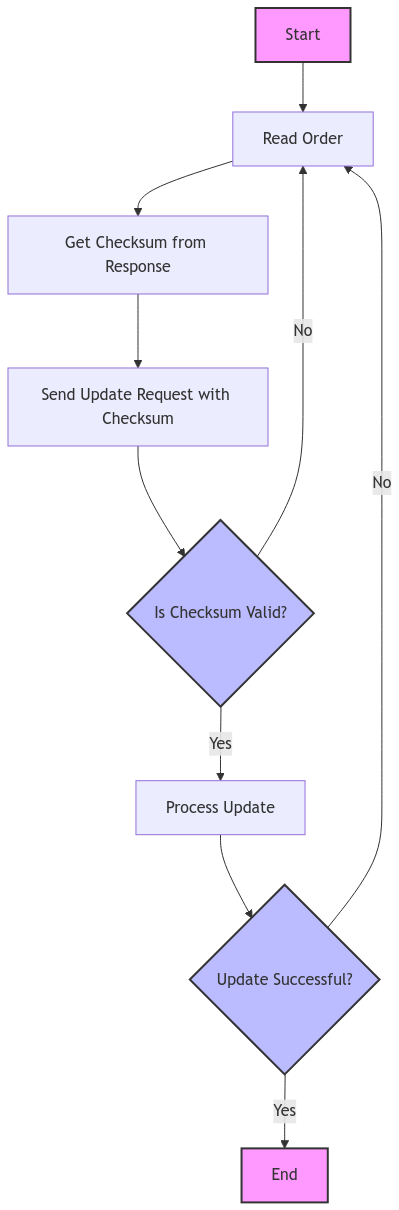
Before updating a Repair Order, it is essential to first read the RO using the endpoint described in Read Service Order. Retrieve the orderReadChecksum from the response and include it as the required orderReadorderReadChecksum header value in your update request.
This ensures data integrity and consistency during the update process.
Parameters Used
Path parameters
| Parameter Name | Value | Description | Required |
|---|---|---|---|
departmentUUID | String | Unique identifier of dealer department | Yes |
orderUUID | String | Unique identifier of dealer order | Yes |
Header
| Parameter Name | Description | Required |
|---|---|---|
{{basic_auth_token}} | Authorization: Base64 encoded string using Service Subscriber Username and password | Yes |
{{orderReadChecksum}} | orderReadChecksum is a required header value that must be included in update requests. It should be the same value that the vendor received from the previous read order response, ensuring data integrity and consistency during the update process. | Yes |
Scope
This request requires the following authorization scopes:
| Scope | Level | Description |
|---|---|---|
order.update | DealerDepartment | Authorizes client to update service order for provided user's dealer department |
Endpoint
curl -X POST "https://api.mykaarma.com/order/v2/department/{{departmentUUID}}/order/{{orderUUID}}"
-H "Authorization: {{basic_auth_token}}"
-H "Content-Type: application/json"
-H "orderReadorderReadChecksum : {{orderReadorderReadChecksum}}"
-d '{
    "order":{
      "type":"RO",
      "header":{
         "orderNumber":"string",
         "serviceAccount":"string",
         "accountingAccount":"string",
         "status":"string",
         "deptType":"string",
         "advisorNumber":"string",
         "advisorName":"string",
         "assignedUserUuid":"string",
         "creatorUserUuid":"string",
         "appointmentNumber":"string",
         "tagNumber":"string",
         "mileageIn":"string",
         "mileageOut":"string",
         "createDate":"string",
         "createTime":"string",
         "promisedDate":"string",
         "promisedTime":"string",
         "voidDate":"string",
         "closeDate":"string",
         "closeTime":"string",
         "waiter":"string",
         "rental":"string",
         "soldHours":"string",
         "actualHours":"string",
         "laborCost":"string",
         "laborSale":"string",
         "laborSaleCustomer":"string",
         "laborSaleInternal":"string",
         "laborSaleWarranty":"string",
         "partsCost":"string",
         "partsCostCustomer":"string",
         "partsCostInternal":"string",
         "partsCostWarranty":"string",
         "partsSale":"string",
         "partsSaleCustomer":"string",
         "partsSaleInternal":"string",
         "partsSaleWarranty":"string",
         "lubeSale":"string",
         "lubeSaleCustomer":"string",
         "lubeSaleInternal":"string",
         "lubeSaleWarranty":"string",
         "miscSale":"string",
         "miscSaleCustomer":"string",
         "miscSaleInternal":"string",
         "miscSaleWarranty":"string",
         "subletSale":"string",
         "subletSaleCustomer":"string",
         "subletSaleInternal":"string",
         "subletSaleWarranty":"string",
         "customerPayAmount":"string",
         "customerPayStateTax":"string",
         "internalPayAmount":"string",
         "warrantyPayAmount":"string",
         "description":"string"
      },
      "vehicle":{
         "uuid":"string"
      },
      "customer":{
         "uuid":"string",
      },
      "jobs":[
         {
            "jobIdentifier":"string",
            "jobNumberString":"string",
            "lopSeqNumber":"string",
            "laborOpCode":"string",
            "laborOpCodeDesc":"string",
            "laborType":"string",
            "laborSale":"string",
            "soldHours":"string",
            "actualHours":"string",
            "partsSale":"string",
            "miscSale":"string",
            "bookerNo":"string",string
            "dispatchLineStatus":"string",
            "techNo":"string",
            "campaignCode":"string",
            "parts":[
              {

                  "partNumber":"string",
                  "description":"string",
                  "seqNo":"string",
                  "quantityOrdered":"string",
                  "quantitySold":"string",
                  "cost":"string",
                  "salePrice":"string",
                  "saleTotal":"string",
                  "laborType":"string"
              }
            ],
            "gog":[
               {
                  "itemType":"string",
                  "itemDescription":"string",
                  "jobNumber":"string",
                  "quantity":"string",
                  "saleTotal":"string",
                  "salePrice":"string",
                  "laborType":"string"
               }
            ],
            "techHours":[
               {
                  "techNo":"string",
                  "partSeqNo":"string",
                  "laborCost":"string",
                  "laborSale":"string",
                  "soldHours":"string",
                  "otherHours":"string",
                  "laborType":"string"
               }
            ],
            "comments":[
               {
                  "comment":"string",
                  "lastUpdatedBy":"string",
                  "updateDate":string"",
                  "updateTime":"string"
               }
            ],
            "ccc":{
               "complaint":"string",
               "complaintCode":"string",
               "cause":"string",
               "correction":"string"
            }
         }

      ],
      "mls" :[
        {
          "laborType": "string",
          "opCode" : "string",
          "opCodeDesc" : "string",
          "failureCode" : "string",
          "salePrice" : "string",
          "costPrice" : "string",
          "saleCompany" : "string",
          "sourceCompany" : "string",
          "lineCode" : "string",
          "poNumber" : "string",
          "poCreateDate" :"string",
          "poLineID" : "string",
          "mlsType" : "string"
        }
      ]
    }
}'
Response
{
  "errors": [
    {
      "errorCode": "string",
      "errorDescription": "string",
      "errorUID": "string"
    }
  ],
  "warnings": [
    {
      "warningCode": 0,
      "warningDescription": "string"
    }
  ],
  "orderUUID": "string",
  "statusCode": "Integer"
}
Request Body
Order Details
| Parameter Name | Description | Required | Field Length |
|---|---|---|---|
type | "RO" for service/repair order | Yes | 2 |
orderNumber | Unique identifier for the order. Ordernumber should match regex ^[a-zA-Z0-9-#_\s]*$ | Yes | 75 |
serviceAccount | Account associated with the service in the DMS. | No | 20 |
accountingAccount | Account used for accounting purposes in the DMS. | No | 20 |
status | Current status of the order . | Yes ( allowed values are OPENED, PRE-INVOICED, CLOSED ) | 50 |
deptType | Type of department handling the order. | No | 20 |
advisorNumber | Identifier for the service advisor in the DMS to which RO is being assigned. | No( only required if assignedUserUuid is blank) | 20 |
advisorName | Name of the service advisor. | No | 90 |
assignedUserUuid | Unique token issued by mykaarma of the dealer associate to which RO is being assigned | No( Required Only if advisorNumber is blank ) | - |
creatorUserUuid | Unique token issued by mykaarma of the dealer associate which is creating the RO. | No | - |
appointmentNumber | Appointment Number (generated in the DMS) associated with RO. | No | 100 |
tagNumber | Identifier for the vehicle tag. | No | 45 |
mileageIn | Mileage of the vehicle when it arrived. | No | 30 |
mileageOut | Mileage of the vehicle when it left. | No | 30 |
createDate | Date when the order was created. yyyy-MM-dd format in UTC timezone | Yes | - |
createTime | Time when the order was created. HH:mm:ss in UTC timezone | Yes | - |
promisedDate | Date by which the service is promised to be completed. yyyy-MM-dd format in UTC timezone. | No | - |
promisedTime | Time by which the service is promised to be completed. HH:mm:ss format in UTC timezone. | No | - |
voidDate | Date when the order was voided. yyyy-MM-dd HH:mm:ss format in UTC timezone. | No | - |
closeDate | Date when the order was closed. yyyy-MM-dd format in UTC timezone | No | - |
closeTime | Time when the order was closed. HH:mm:ss format | No | - |
waiter | Indicates if the customer is waiting for the service. "Y" /"N" | No | 1 |
rental | Indicates if a rental vehicle is provided. "Y"/"N" | No | 1 |
soldHours | Number of hours sold for the service. | No | 10 |
actualHours | Actual hours spent on the service. | No | 10 |
laborCost | Cost of labor for the service. (Only numerics alowed upto 2 decimal places like "12.56" ) | No | 10 |
laborSale | Sale amount for labor. (Only numerics alowed upto 2 decimal places like "12.56" ) | No | 10 |
laborSaleCustomer | Sale amount for labor charged to the customer. (Only numerics alowed upto 2 decimal places like "12.56" ) | No | 10 |
laborSaleInternal | Sale amount for internal labor. (Only numerics alowed upto 2 decimal places like "12.56" ) | No | 10 |
laborSaleWarranty | Sale amount for labor under warranty. (Only numerics alowed upto 2 decimal places like "12.56" ) | No | 10 |
partsCost | Cost of parts used in the service. (Only numerics alowed upto 2 decimal places like "12.56" ) | No | 10 |
partsCostCustomer | Cost of parts charged to the customer. (Only numerics alowed upto 2 decimal places like "12.56" ) | No | 10 |
partsCostInternal | Cost of parts for internal use. (Only numerics alowed upto 2 decimal places like "12.56" ) | No | 10 |
partsCostWarranty | Cost of parts under warranty. (Only numerics alowed upto 2 decimal places like "12.56" ) | No | 10 |
partsSale | Sale amount for parts. (Only numerics alowed upto 2 decimal places like "12.56" ) | No | 10 |
partsSaleCustomer | Sale amount for parts charged to the customer. (Only numerics alowed upto 2 decimal places like "12.56" ) | No | 10 |
partsSaleInternal | Sale amount for internal parts. (Only numerics alowed upto 2 decimal places like "12.56" ) | No | 10 |
partsSaleWarranty | Sale amount for parts under warranty. (Only numerics alowed upto 2 decimal places like "12.56" ) | No | 10 |
lubeSale | Sale amount for lubricants. (Only numerics alowed upto 2 decimal places like "12.56" ) | No | 10 |
lubeSaleCustomer | Sale amount for lubricants charged to the customer. (Only numerics alowed upto 2 decimal places like "12.56" ) | No | 10 |
lubeSaleInternal | Sale amount for internal lubricants. (Only numerics alowed upto 2 decimal places like "12.56" ) | No | 10 |
lubeSaleWarranty | Sale amount for lubricants under warranty. (Only numerics alowed upto 2 decimal places like "12.56" ) | No | 10 |
miscSale | Sale amount for miscellaneous items. (Only numerics alowed upto 2 decimal places like "12.56" ) | No | 10 |
miscSaleCustomer | Sale amount for miscellaneous items charged to the customer. (Only numerics alowed upto 2 decimal places like "12.56" ) | No | 10 |
miscSaleInternal | Sale amount for internal miscellaneous items. (Only numerics alowed upto 2 decimal places like "12.56" ) | No | 10 |
miscSaleWarranty | Sale amount for miscellaneous items under warranty. (Only numerics alowed upto 2 decimal places like "12.56" ) | No | 10 |
subletSale | Sale amount for miscellaneous items under warranty. (Only numerics alowed upto 2 decimal places like "12.56" ) | No | 10 |
subletSaleCustomer | Sale amount for sublet services charged to the customer. (Only numerics alowed upto 2 decimal places like "12.56" ) | No | 10 |
subletSaleInternal | Sale amount for internal sublet services. (Only numerics alowed upto 2 decimal places like "12.56" ) | No | 10 |
subletSaleWarranty | Sale amount for sublet services under warranty. (Only numerics alowed upto 2 decimal places like "12.56" ) | No | 10 |
customerPayAmount | Total amount payable by the customer. (Only numerics alowed upto 2 decimal places like "12.56" ) | No | 10 |
customerPayStateTax | State tax amount payable by the customer. (Only numerics alowed upto 2 decimal places like "12.56" ) | No | 10 |
internalPayAmount | Total internal charges. (Only numerics alowed upto 2 decimal places like "12.56" ) | No | 10 |
warrantyPayAmount | Total amount covered by warranty. (Only numerics alowed upto 2 decimal places like "12.56" ) | No | 10 |
description | Description of the order. | No | 800 |
Vehicle Information
| Parameter Name | Description | Required |
|---|---|---|
vehicle.uuid | Unique identifier issued by mykaarma for the vehicle for which the order is being created. | No Not sending vehicle.uuid will update the order without a vehicle in mykaarma. Please contact your API support representative at mykaarma before making any decision on this. |
Customer Information
| Parameter Name | Description | Required |
|---|---|---|
customer.uuid | Unique identifier issued by mykaarma for the customer for which the order is being created. To obtain this, use the Create or update customer with search for duplicates API. | Yes |
Job details
| Parameter Name | Description | Required |
|---|---|---|
job.jobIdentifier | Unique identifier for the line + labor operation. Example "A-1","B-2" | No |
job.jobNumberString | Unique identifier for the line. Example "A","B","C" | Yes |
job.lopSeqNumber | Sequence number for the labor operation. Example "1","2" ,"3" | No |
job.laborOpCode | Code for the labor operation. Example "OIL" | Yes |
job.laborOpCodeDesc | Description of the labor operation. | No |
job.laborType | Type of labor performed. Perferred allowed values are C/W/I | No |
job.laborSale | Sale amount for the labor.(Only numerics alowed upto 2 decimal places like "12.56" ) | No |
job.soldHours | Number of hours sold for the job. | No |
job.actualHours | Actual hours spent on the job. | No |
job.partsSale | Sale amount for parts used in the job. (Only numerics alowed upto 2 decimal places like "12.56" ) | No |
job.miscSale | Sale amount for miscellaneous items in the job. (Only numerics alowed upto 2 decimal places like "12.56" ) | No |
job.bookerNo | Booker number for the job. | No |
job.dispatchLineStatus | Status of the dispatch line. | No |
job.techNo | Identifier for the technician in the DMS who performed the job. | No |
job.campaignCode | Code for any applicable campaign. | No |
Parts Information
| Parameter Name | Description | Required |
|---|---|---|
part.partNumber | Number identifying the part. | Yes( Required only if one is sending parts along with job ) |
part.description | Description of the part. | No |
part.seqNo | Sequence number for the part. | No |
part.quantityOrdered | Quantity of the part ordered. | No |
part.quantitySold | Quantity of the part sold. | No |
part.cost | Cost of the part. | No |
part.salePrice | Sale price of the part. | No |
part.saleTotal | Total sale amount for the part. | No |
part.laborType | Type of labor associated with the part. | No |
GOG Information
| Parameter Name | Description | Required |
|---|---|---|
gog.itemType | Type of item in the GOG. | No |
gog.itemDescription | Description of the item. | No |
gog.jobNumber | Job number associated with the item. | No |
gog.quantity | Quantity of the item. | No |
gog.saleTotal | Total sale amount for the item. | No |
gog.salePrice | Sale price of the item. | No |
gog.salePrice | Sale price of the item. | No |
gog.laborType | Type of labor associated with the item. | No |
Tech Hours
| Parameter Name | Description | Required |
|---|---|---|
tech.techNo | Identifier for the technician in the DMS who performed the job. | No |
tech.partSeqNo | Sequence number for the part. | No |
tech.laborCost | Cost of labor for the technician. | No |
tech.laborSale | Sale amount for the labor. | No |
tech.soldHours | Number of hours sold for the technician's work. | No |
tech.otherHours | Additional hours associated with the technician's work. | No |
tech.laborType | Type of labor performed by the technician. | No |
Comments
| Parameter Name | Description | Required |
|---|---|---|
comments.comment | Text of the comment. | No |
comments.lastUpdatedBy | Identifier for the person who last updated the comment. | No |
comments.updateDate | Date when the comment was last updated. yyyy-MM-dd format UTC timezone | No |
comments.updateTime | Time when the comment was last updated. HH:mm:ss format UTC timezone | No |
Complaint cause correction
| Parameter Name | Description | Required |
|---|---|---|
ccc.complaint | Description of the customer's complaint. | No |
ccc.complaintCode | Code for the complaint. | No |
ccc.cause | Cause of the job. | No |
ccc.correction | Correction made to address the complaint. | No |
MLS Information
| Parameter Name | Description | Required |
|---|---|---|
mls.laborType | Type of labor in the MLS. | No |
mls.opCode | Operation code in the MLS. | No |
mls.opCodeDesc | Description of the operation code. | No |
mls.failureCode | Code for any failure. | No |
mls.salePrice | Sale price in the MLS.. | No |
mls.costPrice | Cost price in the MLS. | No |
mls.saleCompany | Company responsible for the sale. | No |
mls.sourceCompany | Company that sourced the item. | No |
mls.lineCode | Code for the line item. | No |
mls.poNumber | Purchase order number. | No |
mls.poCreateDate | Date when the purchase order was created in UTC timezone | No |
mls.poLineID | Line ID for the purchase order. | No |
mls.mlsType | Type of MLS entry. | No |
Response Object Explanation
{{orderUUID}} uuid of the order which was created/updated .
{{errors}} An array of error objects detailing issues encountered during order creation or update.
{{warnings}} An array of warning objects providing non-critical alerts encountered during order creation or update.
{{errors.errorCode}} Code indicating the specific error encountered during order creation or update; refer to the API reference for a list of possible error codes.
{{errors.errorTitle}} Title describing the specific error encountered during order creation or update; refer to the API reference for detailed descriptions.
{{errors.errorDescription}} Detailed message describing the specific error encountered during order creation or update; refer to the API reference for more information.
{{warnings.warningCode}} Code indicating the specific warning encountered during order creation or update; refer to the API reference for a list of possible warning codes.
{{warnings.warningDescription}} Detailed message describing the specific warning encountered during order creation or update; refer to the API reference for more information.
Ownership change
In myKaarma, we provide the flexibility to change the ownership of a Repair Order (RO) for existing orders. This means that if you pass a different customer UUID in the update order request, the ownership of the order will switch from the existing customer to the incoming one. This feature allows for seamless transitions and updates in customer information, ensuring that the correct customer is associated with each order. By enabling this functionality, we help maintain accurate and up-to-date records, reflecting any changes in customer relationships or order management.
Order updates for DMS Orders
Presently we don't allow any updates to be made on Orders originated from the (dealer's DMS)(unless they are created via myKaarma in the first place)
In case any vendor(non DMS) wants to update the order, they are requested to propagate that change in the DMS itself and which will eventually be synced with myKaarma.